KGraphLang is a knowledge graph query language designed for Ensemble Reasoning and Reasoning LLMs.
Reasoning LLMs are trained to split a request into steps and then consider and follow each step to complete the request, revising the steps as needed. Ensemble Reasoning is a method of taking advantage of this step-wise reasoning process to execute steps directly during the reasoning process. This dramatically improves the performance of A.I. Agents by eliminating the latency of switching between LLMs and tool calls.
More information about Ensemble Reasoning is available in the articles:
KGraphLang is designed to be simpler than query languages like SQL and graph query languages like SPARQL and OpenCypher.
By stripping the query language to just the essentials, we empower LLMs and fine-tuned SLMs to generate syntactically valid queries without ambiguity.
The loss of the more general and complex syntax of other query languages is made up for by defining domain specific predicates.
The KGraphLang specification defines predicates as relations between parameters. An application of KGraphLang defines domain specific predicates such as friend(?X,?Y) which defines a friend relation between parameters ?X and ?Y.
By defining good predicates we can choose exactly what the LLM can access and hide any complexity inside the predicate implementations, keeping the LLM interface clean and minimalist. This also allows direct control over what information the LLM can access as predicates act as the gateway to all data.
As an example, let’s consider a supply chain application.
Using KGraphLang, we can define predicates for supply chain cases such as:
These predicates are implemented using queries to the underlying knowledge graph or via code, such as a weather service API.
The A.I. Agent, Porter, receives a report that the delivery of 500 controller motors that are critically needed in the manufacturing process of widgets for WidgetCo is delayed, and is given the task of finding an alternate source.
Porter can generate kgraphlang queries to lookup information using the predicates and find an alternate source of the controller motors that fit the needs of WidgetCo. These queries are processed as they are generated, so the reasoning trajectory can change as information is retrieved in real time.
Thus, Porter can generate and execute a kgraphlang query such as:
?MinCost = min { ?C |
	?Supplier in ?Suppliers,
	route(?Supplier, WidgetCo, ?Route),
	cost(?Route, ControllerMotor, ?C)
}
during reasoning to determine the minimum delivery cost given a list of suppliers, and have this cost estimate affect the next steps of Porter’s reasoning. The next step could be using the performance() predicate to estimate the likelihood of on-time delivery. Porter can decide to switch to a different supplier if the cost and delivery estimate is not acceptable. Much in the same way a Reasoning LLM can continue to reason on a math problem until a solution is found, a Reasoning LLM can continue to use kgraphlang queries until an acceptable solution is found, and the alternate source of controller motors is secured.
KGraphLang Predicates
Predicates define a relation between parameters. For knowledge graphs, these often are traversals on the knowledge graph. For instance,
friend(?Person1, ?Person2)
could define a traversal on the graph from ?Person1 to ?Person2 along a relation or “edge” representing friendship.
which would follow a two-hop path from ?Person1 to ?Person3 along “friendship” relations.
The kgraphlang predicates can directly be implemented in code, or use an underlying data source. For Ensemble Reasoning, the implementation uses KGraphService to implement predicates over a knowledge graph.
Besides traversing the knowledge graph, there are two other major types of predicates: Vector Similarity Predicates and String Hash Predicates.
Vector Similarity Predicates make use of vectors and vector search to find similar knowledge graph elements. This is critical to support “Graph RAG” functionality ( https://microsoft.github.io/graphrag/). A node representing a supplier in our earlier example could be similar to other suppliers if they supply similar products or are otherwise similar.
String Hash Predicates make use of string hashing and string hash searching to find text that is similar on a character by character basis. This can be helpful to match names like “Jon Smith” would be very similar to “John Smyth”, or to find documents that contain overlapping language.
KGraphLang Syntax
KGraphLang supports a comprehensive syntax while maintaining simplicity to enable high quality LLM query generation.
The syntax includes:
Predicates implemented in code or via queries to an underlying data source
Predicate annotation with extra-logical values like @top_k(10) to control predicate output
Grouping and logical AND, OR, NOT
Comparisons: >, <, >=, <=, !=
Aggregation functions: collections, count, sum, average, max, min
Math functions
Data types: string, number, boolean, date, time, currency, geolocation, units, URIs
This retrieves a list of Person records, each of which having an id, name, and email address.
KGraphLang Implementation
The KGraphLang implementation evaluates kgraphlang queries based on a set of registered predicates.
The predicates are implemented either using an underlying data source or directly in code.
Predicates implemented using KGraphService use an underlying knowledge graph implemented by a graph and vector database. This means that, internally, the kgraphlang query is translated into a target query language such as OpenCypher, SPARQL, or GraphQL which is used with the implementing database. So, predicates are a means of bundling complex queries into simple chunks the LLM can easily work with.
An example of a predicate directly implemented in code could be:
weather(?Location, ?DateTime, ?Report)
which could be implemented via an API call to a weather service to get an accurate weather report at the time the query is evaluated.
The KGraphLang implementation parses the query and then evaluates it, but there are cases when the parse can be used directly. Parsing the kgraphlang query produces an AST (abstract syntax tree), which can be manipulated first and then later evaluated. This is useful in cases of optimizing the query or replacing predicates with pre-cached values.
KGraphLang Fine-tuning
Reasoning LLMs such as R1-Distill-Llama are successful in producing valid KGraphLang queries using only prompting. However, fine-tuning should improve generation and reduce the prompting needed for KGraphLang requests to only the predicate definitions for that request. Also, fine-tuning SLMs should allow domain specific SLMs to produce valid KGraphLang queries with specific sets of predicates included in the training, making for a highly optimized query capability.
We’re in the process of collecting datasets to use for kgraphlang fine-tuning.
Source Code
All source code is open-source and available via GitHub.
A follow-up article will present an implementation of KGraphLang predicates based on sample datasets to make it easy to run examples, and subsequent articles will explore deploying Ensemble Reasoning with kgraphlang.
If you are interested in utilizing kgraphlang as part of your Reasoning LLM and A.I. Agent implementations, please contact us at Vital.ai!
Deepseek released the R1 LLM today, January 20th, and the Qwen team from Alibaba released the QwQ Preview LLM model about 6 weeks ago. Both of these are open-source and are reasoning models, similar in nature to the o1 series from Open AI.
Ensemble Reasoning combines a reasoning model with reasoning components that are directly integrated into the LLM. Together, these form an ensemble implementing advanced reasoning.
In this article I’ll discuss some early experiences using R1 and QwQ as the conductor of a Reasoning Ensemble.
A quick overview of Ensemble Reasoning
Ensemble Reasoning can be used as the brain of an A.I. Agent and complements current A.I. Agent frameworks. It does this by moving certain Agent “tools” directly into the LLM, which can enhance performance, increase quality, and ultimately drive down cost.
A.I. Agents are typically implemented with a “loop” between an LLM to decide what to do, then using tools to do those things, then back to the LLM to think some more. Each pass of the “loop” involves latency and the overhead of re-starting “thinking”.
In contrast, Ensemble Reasoning allows an LLM to directly tap into tools during the reasoning (inference) process without stopping. So, latency and overhead goes away for those tools.
A good candidate to be a member of the ensemble is a database. By being directly connected to the reasoning LLM, the LLM can query the database as it reasons, changing the trajectory of reasoning as it accesses new data from the database. Because it is querying the data and not writing to the database, the reasoning model is able to explore many reasoning pathways without needing to retract any actions as it is not changing the state of the system, just “thinking” about it.
A tool that would not be a member of the ensemble would be a tool to send out a marketing email. Once an email is sent, you can’t change your mind and un-send it. So, a tool like this would continue to be in the Agent “loop” and only be triggered once the reasoning model has completed reasoning and firmly decided to send out the email, with an Agent framework “running” that tool call and reporting back to the LLM afterwards.
Open Source Reasoning Models
Models such as QwQ, R1, and Phi-4 (Microsoft) are open source, which allows any developer to access and experiment with them. This is critical in order to integrate the members of an ensemble with the “conductor” reasoner model and then experiment to find the best combinations. This is not possible with closed source models such as o1.
Since it was released, we’ve experimented with the QwQ model, and just now tried some of the same experiments with R1.
Reasoning Ensemble Members
Our current experiments include these ensemble members:
Assisting LLM.
4o-mini is used as an assisting LLM.
Web Search and Summarization.
Web search via Google
Search results summarized using the assisting LLM.
Code Executor.
Python code is executed in a sandbox
Output returned to the LLM.
Logic Query of Knowledge Graph
Knowledge Graph Queries
Search graph nodes and edges
Traverse the graph
These ensemble members are meant to test the reasoner’s ability to take advantage of different kinds of resources. Many other types of ensemble members are possible, such as graph neural networks (GNNs) for recommendation systems or image generation models.
Reasoner and Member Integration
The reasoner model and the members use the context window of the reasoner model to share information. So, think of this as a shared memory space where the reasoning model and the ensemble members can add to the sequence accumulating in the context. When the reasoner wants to call a member, the call is generated just like normal tokens. However, the call is surrounded by special “magic” tokens which trigger the ensemble member to process it. And similarly, the response from the member is written into the context surrounded by “magic” tokens, allowing the reasoner to then be aware of and use this information.
Ensemble members should be able to keep pace with the LLM, otherwise latency is added back in, diminishing the advantage of the Reasoning Ensemble. Co-located LLMs, code execution, and local databases, including knowledge graph databases, are the best fit for this. For cases like a web search, it becomes an engineering decision as to whether it’s better to introduce a little latency in the reasoning to wait for the web search to complete vs the greater overall latency and overhead of an Agent “loop” to get the web search results via running a separate tool and restarting reasoning.
Example of User Requests to the Ensemble
Logic Puzzle:
Solve this puzzle and be concise in your reasoning.

Selena, Jennifer and Miley wear a blue dress, yellow dress, and green dress in an unknown order. It is known that:

1) If Selena wears blue, then Jennifer wears green.

2) If Selena wears yellow, then Miley wears green.

3) If Jennifer does not wear yellow, then Miley wears blue.

What is the color of the dress Selena is wearing?
This is a baseline test, and no ensemble members are needed for this one.
Question Answer:
What is Jimmy Carter's birthday?
We tell the reasoner to not trust its own memory, so this triggers a web search to find this information.
Code Writing and Execution:
Calculate the factorial of 20.
We tell the model that it should not trust its memory and that it is very bad at writing code but its LLM Assistant is very good at writing code. So, this triggers the reasoner communicating with the assisting LLM for code writing, then executing it with the code executor, then evaluating the result.
Research:
How many companies does Elon Musk run?

Support your answer with evidence.
This triggers multiple web searches to try to get recent information to answer this question.
Knowledge Graph Query and Navigation:
Give me a list of the addresses of all my friends.
This triggers generating knowledge graph queries and interpreting the results. It’s the most complex of these tests as the model is attempting to use a query system without significant prior knowledge or documentation. But, it’s the most interesting as fast graph queries can be integrated directly into reasoning to form a true neuro-symbolic implementation that utilizes external knowledge directly without the LLM being trained on it.
How did the models perform?
Our tests using the requests above were meant to get a qualitative feel for the capabilities of these models, and were not conducted in a rigorous way. Nevertheless, some interesting lessons were learned.
We used models that were quantized to run locally on a Mac.
Specifically:
QwQ-32B-Preview-Q5_K_S.gguf
DeepSeek-R1-Distill-Llama-70B-Q3_K_M.gguf
The local environment uses llama.cpp, and we also run deployments using vLLM on runpod.
No significant optimizations were performed with the LLMs, other than experimenting with different prompts.
The ensemble conducted by QwQ and the ensemble conducted by R1 were both able to complete all of the requests, with a good amount of prompt tweaking to get there.
The character of the two models, for lack of a better term, is very different.
The R1 model tends to try one reasoning path and either succeeds quickly or gives up.
The QwQ model is incredibly verbose, almost comically so, and continues to try and try and try until either succeeding or getting lost in second guessing (see example full trace below).
As example of this dithering, for the Elon Musk question, the QwQ model kept considering and then dismissing whether the proposed “D.O.G.E” initiative counted as a company (it eventually decided not) and contemplated what counted as “running” – does an overzealous board member making press releases count as “running” Neuralink? QwQ googled each company name to look for press releases. R1 by contrast barely did one google search before concluding good enough.
Each of the models struggled a bit to understand that it could make a request of an ensemble member and get information immediately. The training of these models includes material about making tool calls when concluding reasoning, rather than in the midst of reasoning. Some fine tuning or other optimization is likely necessary. Prompt language had to be included to convince the model to make the ensemble requests to get real information back. QwQ kept thinking it was getting “simulated” data to help it formulate the “real” tool call, until it was convinced otherwise via prompting. The fact that the ensemble calls worked as well as they did with only prompt tweaking is very promising, and likely means only minor training updates would be needed to “bake in” this capability more directly in the reasoning model.
Both models have some quirks. For some reason QwQ would not indent python code correctly without convincing it it needed to use “tabs” instead of “spaces”. QwQ could not be convinced to include tags around “thoughts” to more cleanly separate them from conclusions, whereas R1 produces a “thinking” tag around its thoughts, but its thoughts and conclusions are nearly identical.
We may have a “Goldilocks” situation where R1 thinks too little and QwQ thinks too much, and we’re waiting to get the “just right” dialed in.
Concluding Thoughts:
Both the QwQ and R1 were successful at being the conductor of a Reasoning Ensemble. There were marked differences in the models, which is a good thing. We’re not in an echo chamber of the same models produced with the same training data. There were definite limitations and areas for improvement, some simple and others more systemic.
Given the pace of advancement, production ready open source reasoning models appear to be no more than months away. Reasoning Ensembles can combine a Reasoning Model with other LLMs in direct integration. This could enable a (relatively) small Reasoning Model to only focus on reasoning and leave tasks such as code writing to expert LLMs acting as supporting members of the ensemble. This enables specialization in the models and even more powerful ensembles to be deployed.
A.I. Agents are currently limited in many ways by latency and overhead. Reasoning models utilized within Reasoning Ensembles solve the A.I. Agent latency and overhead problems while providing an even more powerful reasoning center.
New techniques such as Transformer² (Transformer Squared from Sakana AI: https://sakana.ai/transformer-squared) and Titans (Replacement for the Transformer Architecture from Google: https://arxiv.org/abs/2501.00663) push more capability into the LLM, and Reasoning Ensembles are part of this direction.
Contact us at Vital.ai to make Ensemble Reasoning part of your A.I. Agent strategy.
Source code for the Ensemble Reasoning open-source framework will be available in github in:
Additional notes on the Knowledge Graph Ensemble Member
Here is the prompt used for the knowledge graph ensemble interface in our experiments:
- To use the logic query tool, you must use:
◖<ensemble:logic_query>
*logic query*
</ensemble:logic_query>◗
This will execute the query and produce the results:
◢<ensemble:logic_query_result>
*logic query results*
Code Execution Confirmation: *confirmation id*
</ensemble:logic_query_result>◣
When you want to use the logic query tool, as the very first thing, write a simple query and run it!
Do this before planning anything more detailed. Getting some query results will give you information about the data format and save you a lot of questions.
The queries are super fast so you can use them often without any penalty.
What is also great is that you never need code to parse the logic query results because they are in a simple format you can easily understand.
The information in the knowledge graph is organized into Nodes and Edges where:
Node1 --Edge--> Node2
Nodes can be entities or frames.
A frame contains information about an entity and is linked like:
EntityNode --Edge--> FrameNode
An example of a Node would be a Person like "John"
This could contain a map of entity information like a Key/Value for:
name: "John"
An example of a Frame would be AddressFrame.
This could contain a map of address info with a Key/Value like:
street: "123 Main St"
The logic queries are written in a language similar to prolog called Flora-2 (aka ErgoAI).
The following documentation is the complete documentation available for your knowledge graph.
Do not do a web search to learn more as no information is available. Only use the description herein.
Do not ask the LLM Assistant for help with it. The LLM Assistant does not have this documentation.
Do not add additional logic or syntax other than the terms listed here.
Never ever ever try to use python to parse the query results.
The query results are already in a simple format, just read the values you want out of the data manually by parsing it with your mind.
You have the ability to process the query results and split them into the components you want without using python code and without errors.
You must report the confirmation code from the code logic query tool to verify that you used the tool.
You can use these logic query terms:
friend(?Friend)
?Friend is a URI like: 'urn:person1'
search_friends(?SearchTerm, ?Friend)
?SearchTerm is a keyword like 'Fred'
?Friend is a URI like: 'urn:person1'
get_friend(?Friend, ?FriendString)
?Friend is a URI like: 'urn:person1'
?FriendString is a string that contains a key-value map of Friend information.
It looks like: fred[URI->'urn:fred', name->'Fred']
This is a simple human readable format.
All friends have a friend string.
get_frame(?URI, ?FrameString)
?URI is the URI of a frame, like 'urn:frame1'
?FrameString is a string that contains a key-value map of Frame information including it's type. It is similar to get_friend().
?FrameString is in a simple human readable format.
traverse(?Node, ?TraverseNode)
?Node is a URI like 'urn:node1'
?TraverseNode is a URI like 'urn:node2'
These nodes are linked via:
Node --Edge--> TraverseNode
or
Node <--Edge-- TraverseNode
traverse_outgoing(?Node, ?OutgoingNode)
Same as traverse(?Node, ?TraverseNode) except only:
Node --Edge--> OutgoingNode
traverse_incoming(?Node, ?IncomingNode)
same as traverse(?Node, ?TraverseNode) except only:
Node <--Edge-- IncomingNode
You can leave a variable as a variable like: ?Node
or you can replace it with a value like: 'urn:person1' (not a real value)
You must terminate a logic query with a '.'
You may combine query terms with a ',' which is a conjunction. All query terms in a conjunction must be true for the query to complete.
Examples:
friend(?Friend).
This would enumerate all the URIs of all the friends (the complete list).
get_friend('urn:person123', ?FriendString).
This would get the ?FriendString of the friend with URI 'urn:person123'
QwQ attempted to find additional documentation via web search, asked the assistant LLM for help (4o-mini), and tried to write python to parse the query results returned from the logic_query. The prompt was tweaked to get it to not do these things, and it became satisfied eventually.
R1 by contrast got it almost right on the first try but then didn’t really explore how to fix its plan. With some prodding in the prompt it eventually figured it out. Occasionally it would mis-match the ensemble tags, which was a bit unexpected.
Note the magic strings ◖ and ◗ for ensemble requests and ◢ and ◣ for ensemble responses.
These were chosen somewhat arbitrarily and they may or may not be the best choices. We wanted symbols that would be rarely used for anything else so they would be semantically neutral and visually have a right and left pairing to make an obvious demarcation of start and end ensemble requests and responses. These were the symbols for QwQ with R1 having different but similar symbols, just due to differences in tokenization in the models.
Full Reasoning Trace of QwQ and the Knowledge Graph “Address” Query Request
It’s verbose, I warned you!
This includes the prompt followed by the QwQ generation and interwoven Reasoning Ensemble requests/results.
<|im_start|>system You are a helpful and harmless assistant. You are Qwen developed by Alibaba. You should think step-by-step.<|im_end|> <|im_start|>user
Today is Monday, January 20, 2025. You are a friendly and concise reasoning A.I. Agent. Your name is Haley. You have received a request from Marc. You always think and answer in the English language. You don't use Chinese unless you are specifically asked to by the user.
You are helping a person with a single request. You are not trying to find a general solution, you just want to quickly solve the immediate request at hand.
You have the special ability to execute tools to help you answer a user's request accurately while you are thinking about it. When you use tools you are using the real tool with real data executing real code in the real world. This is not a simulation. You both reason about what to do and use tools immediately to complete the request. You return a final answer and not a plan unless you don't have the tools necessary to complete the plan yourself.
The symbols ◖ and ◗ are magic symbols used to execute tools. The symbols ◖ and ◗ are used to denote the start and end of a tool request, respectively. The tools get results and provide the results to you immediately allowing you to continue thinking using the new information. You must use the symbols ◖ and ◗ when making a tool request otherwise it is not a valid request and it will not run. Do not use the symbols ◖ and ◗ unless you are executing a tool.
The symbols ◢ and ◣ are magic symbols used to denote the start and end of a tool response. Never use the symbols ◢ and ◣ as these are used exclusively for the tool results. You treat the tool results between ◢ and ◣ as highly trustworthy. You trust knowledge from tools between symbols ◢ and ◣ more than your own memory and your ability to calculate. Tool results are only valid when demarcated with ◢ and ◣
------------------
You have: - web search tool - python code executor - logic query tool for querying knowledge graph of Marc - an LLM assistant that is very fast and is an expert at writing python code.
You do not write python code. You are bad at python coding. You have a tool for python coding that works great!
Your tools: - To do a web search, use ◖<ensemble:search_query>*your search query*</ensemble:search_query>◗
the system will immediately search and analyze relevant web pages and then provide you with helpful information in the format: ◢<ensemble:search_result>*search results*</ensemble:search_result>◣
You can search multiple times if necessary. The maximum number of search attempts is limited to 5.
- To execute python code, you must use: ◖<ensemble:code_execution> *python code to execute* </ensemble:code_execution>◗ You must format python code with proper indentation using tabs (not spaces). The system will execute the python code immediately and provide you with the output in the format: ◢<ensemble:code_result>{'success': True, 'output': 'STDOUT from your code execution'} Code Execution Confirmation: *execution-identifier* </ensemble:code_result>◣
Here is an example, note the indentation (as tabs) in the code: ◖<ensemble:code_execution> ```python def execute_math_expression(expression: str): try: result = eval(expression) print(f"Result: {result}") except Exception as e: print(f"Error: {e}")
You must use the python code execution tool for math problems and anything convenient to answer using python code. Do not try to interpret python code without using the tool. You must run the python code using the tool. Very Important: You must format code with proper indentation using tabs (not spaces) at all times or it will not run! You must report the confirmation code from the code execution tool to verify that you used the tool.
- To use the logic query tool, you must use: ◖<ensemble:logic_query> *logic query* </ensemble:logic_query>◗
This will execute the query and produce the results:
When you want to use the logic query tool, as the very first thing, write a simple query and run it! Do this before planning anything more detailed. Getting some query results will give you information about the data format and save you a lot of questions. The queries are super fast so you can use them often without any penalty.
The information in the knowledge graph is organized into Nodes and Edges where: Node1 --Edge--> Node2
Nodes can be entities or frames. A frame contains information about an entity and is linked like: EntityNode --Edge--> FrameNode
An example of a Node would be a Person like "John" This could contain a map of entity information like a Key/Value for: name: "John" An example of a Frame would be AddressFrame. This could contain a map of address info with a Key/Value like: street: "123 Main St"
The logic queries are written in a language similar to prolog called Flora-2 (aka ErgoAI). The following documentation is the complete documentation available for your knowledge graph. Do not do a web search to learn more as no information is available. Only use the description herein. Do not ask the LLM Assistant for help with it. The LLM Assistant does not have this documentation. Do not add additional logic or syntax other than the terms listed here. Never ever ever try to use python to parse the query results. The query results are already in a simple format, just read the values you want out of the data manually by parsing it with your mind. You have the ability to process the query results and split them into the components you want without using python code and without errors. You must report the confirmation code from the code logic query tool to verify that you used the tool.
You can use these logic query terms:
friend(?Friend) ?Friend is a URI like: 'urn:person1'
search_friends(?SearchTerm, ?Friend) ?SearchTerm is a keyword like 'Fred' ?Friend is a URI like: 'urn:person1'
get_friend(?Friend, ?FriendString) ?Friend is a URI like: 'urn:person1' ?FriendString is a string that contains a key-value map of Friend information. It looks like: fred[URI->'urn:fred', name->'Fred'] This is a simple human readable format. All friends have a friend string.
get_frame(?URI, ?FrameString) ?URI is the URI of a frame, like 'urn:frame1' ?FrameString is a string that contains a key-value map of Frame information including its type. ?FrameString is in a simple human readable format.
traverse(?Node, ?TraverseNode) ?Node is a URI like 'urn:node1' ?TraverseNode is a URI like 'urn:node2' These nodes are linked via: Node --Edge--> TraverseNode or Node <--Edge-- TraverseNode
traverse_outgoing(?Node, ?OutgoingNode) Same as traverse(?Node, ?TraverseNode) except only: Node --Edge--> OutgoingNode
traverse_incoming(?Node, ?IncomingNode) same as traverse(?Node, ?TraverseNode) except only: Node <--Edge-- IncomingNode
You can leave a variable as a variable like: ?Node or you can replace it with a value like: 'urn:person1' (not a real value)
You must terminate a logic query with a '.' You may combine query terms with a ',' which is a conjunction. All query terms in a conjunction must be true for the query to complete.
Examples:
friend(?Friend). This would enumerate all the URIs of all the friends (the complete list).
get_friend('urn:person123', ?FriendString). This would get the ?FriendString of the friend with URI 'urn:person123'
This would get all friend and friend frame info for the friend with uri 'urn:person123'
Note: this is a prolog-like language so a variable like ?FriendString will bind to exactly one value within a query. A query like: get_friend('urn:person123', ?FriendString), get_friend('urn:person456', ?FriendString).
will not return results because the ?FriendString variable can not bind to two different values.
Query Results will be in a list such as: (1) ?Variable1 = urn:house1 (1) ?Variable2 = house1[URI->'urn:house1', size->'Big']
You may use any prompt in the LLM assistant request. You must use the LLM for writing python code since it is an expert to writing python code. Since the LLM is writing the python code, you just need to tell it like a human how it should work. You don't need to design or plan or think how the code works yourself. You don't need to understand the code, you just run it. Very Important: You must format code with proper indentation using tabs (not spaces) at all times. ------------------
Once you have the information you need, you continue your reasoning.
If a tool will help you complete the request, you must use it before your final answer. If you are asked for code execution or a query, you must do it before the request is completed.
------------------
Example: User Question: "Who got the first Nobel Prize in Physics?"
Your thinking steps: I need to find out who was awarded the first Nobel Prize in Physics.
Your tool request and result: ◖<ensemble:search_query>first Nobel Prize in Physics winner</ensemble:search_query>◗ ◢<ensemble:search_result>Wilhelm Conrad Röntgen won the first Nobel Prize in Physics in 1901 for discovering X-rays</ensemble:search_result>◣
You continue reasoning with the new information to provide the final answer...
------------------
Note: Tools execute as soon as you write the tags surrounded by ◖ and ◗. If you want to think about the tags without them executing, just write the tags and don't write either the ◖ and ◗ symbols.
Do not mix up your start tag and end tag! This will not work because the result tag is wrong: ◖<ensemble:search_query>*search query*</ensemble:search_result>◗
Remember: - You don't write python code. - Never ever ever try to use python to parse the logic query results. They are already human readable, so just mentally process them as needed to handle the request. - For factual information, do not trust your memory and trust knowledge from tools between symbols ◢ and ◣ - Use ◖<ensemble:search_query>*search query*</ensemble:search_query>◗ - Use ◖<ensemble:code_execution>*your python code*</ensemble:code_execution>◗ - Use ◖<ensemble:logic_query>*your logic query*</ensemble:logic_query>◗ - Use ◖<ensemble:llm_request>*your request to the LLM</ensemble:llm_request>◗ Please answer the following request. Request: ---------------
Give me a list of the addresses of all my friends.
--------------- Also: You should list the tools that you used for this request, if any. If you used them, you must include the confirmation code(s) from the logic query and code execution tools. You should provide your final answer in the format \boxed{YOUR_ANSWER}.
<|im_end|> <|im_start|>assistant
Okay, so Marc wants a list of addresses for all his friends. I need to figure out how to get that information using the tools I have. Let's see what tools are available to me.
First, there's a web search tool. That might be useful if the addresses are publicly available online, but I don't think that's the case here. Marc probably has this information stored in his knowledge graph or somewhere private. So, maybe the web search isn't the best tool for this job.
Next, there's a Python code executor. I'm not great at Python, but I have a tool that can help me write and execute code. Maybe I can use some Python script to retrieve the addresses from somewhere, but I'm not sure yet.
Then, there's a logic query tool for querying Marc's knowledge graph. That sounds promising because his friends' addresses might be stored in this knowledge graph. I need to figure out how to use this tool to query the graph and get the addresses.
Lastly, there's an LLM assistant that's an expert at writing Python code. Maybe I can ask this assistant to help me write a Python script to fetch the addresses if needed.
Alright, let's start by understanding what's in this knowledge graph. I need to know how the data is structured to query it properly. From the documentation, it seems that the knowledge graph consists of nodes and edges, where nodes can be entities or frames, and frames contain additional information about entities.
Specifically, friends are entities with URIs, like 'urn:person1', and there are frames that hold details such as addresses. So, probably, each friend has a node, and there are edges connecting these friend nodes to their respective address frames.
First, I need to get a list of all friends. According to the documentation, there's a predicate called "friend(?Friend)" that can be used to get URIs of all friends. Then, for each friend, I need to get their friend string, which contains some information, and possibly traverse to their address frame to get the address details.
Wait, the "get_friend" predicate seems to provide a string that contains a key-value map of friend information. Maybe the address is included directly in this string, or maybe it's a separate frame that I need to traverse to.
Let me look at the example given: get_friend('urn:person123', ?FriendString). The result is something like "fred[URI->'urn:fred', name->'Fred']". It looks like the friend string contains key-value pairs, but it's not clear if the address is included in this string or if it's in a separate frame.
I think I need to query the knowledge graph to see what information is included in the friend string and whether the address is there or needs to be retrieved separately.
Maybe I should start by getting the friend string for one friend to see what it contains. Let's pick a friend, say 'urn:person123', and use the get_friend predicate to see what's in the friend string.
But I don't know the URI for any specific friend off the top of my head. I need to first get a list of friend URIs using the friend(?Friend) predicate.
So, my first step should be to execute a logic query to get all friend URIs.
Then, for each friend URI, I can use get_friend to get their friend string and see if the address is included there.
If not, I might need to traverse from the friend node to their address frame using the traverse predicate and then use get_frame to get the address details.
But before diving into that, maybe I should check if the address is already included in the friend string.
Let me try querying for one friend's friend string to see its structure.
Wait, but I don't know any specific friend's URI yet. Maybe I should first get a list of friend URIs.
So, I'll start with the query: friend(?Friend).
I need to execute this logic query to get all friend URIs.
Then, for each ?Friend, I can use get_friend(?Friend, ?FriendString) to get their friend string.
I should look at a few friend strings to see if the address information is included there.
If not, I'll need to traverse from the friend node to their address frame and get the frame string, which should contain the address details.
I think that's the way to go.
Also, I should keep in mind that the logic query tool returns results in a specific format, with each result binding variables like ?Friend and ?FriendString, and I need to parse these results manually since I can't use Python to parse them.
But the results are in a human-readable format, so I should be able to extract the necessary information by reading them.
Let me try executing the first logic query to get all friend URIs.
I need to write the logic query enclosed in ◖<ensemble:logic_query> and ◗.
(3) ?Friend = 'urn:fred' Code Execution Confirmation: 11c1b92c-e8c7-4d70-9e39-e4a174641020. </ensemble:logic_query_result>◣ Okay, so there are three friends: Jane, Mary, and Fred, with their respective URIs.
Now, for each of these friends, I need to get their friend string using get_friend(?Friend, ?FriendString).
Let me write a logic query to get the friend strings for all friends.
So, the query would be:
get_friend(?Friend, ?FriendString).
But since ?Friend is a variable, it will return the friend strings for all friends.
(3) ?Friend = 'urn:jane' (3) ?FriendString = 'jane[URI->'urn:jane', name->'Jane']' Code Execution Confirmation: 0f217489-5792-4014-8645-26a9b7bc0866. </ensemble:logic_query_result>◣ Hmm, from these friend strings, I can see that they include the URI and the name of the friend, but no address information.
So, it seems like the address is stored in a separate frame that's linked to the friend node.
Looking back at the documentation, there's a traverse predicate that can be used to follow edges between nodes.
Probably, each friend node has an edge to their address frame.
So, I need to traverse from the friend node to their address frame and then use get_frame to retrieve the address information.
Let me try constructing a logic query that gets the friend string and then traverses to their address frame.
This should get the friend string and then follow an outgoing edge from the friend node to an address frame, and then get the frame string, which should contain the address details.
Frame string: 'jane_address[URI->'urn:jane_address', type->'Address', street->'789 Jane Way', state->'NJ', city->'Anytown', zip->'08090']'
Address: 789 Jane Way, Anytown, NJ, 08090
So, now I can list the addresses for each friend.
But Marc might want just the list of addresses without the names, or perhaps with names included. Since the request is "Give me a list of the addresses of all my friends," I think including the friend's name with their address would be helpful.
So, I'll prepare a list that shows each friend's name followed by their address.
Let me compile that list.
First, Fred:
Fred
123 First Ave., Philadelphia, PA, 19127
Then, Mary:
Mary
456 Main Street, Beverly Hills, CA, 90210
Finally, Jane:
Jane
789 Jane Way, Anytown, NJ, 08090
I should arrange this in a clear format, perhaps each friend's name and address on separate lines, with each friend's information grouped together.
Alternatively, I could list them in a table format, but since I'm writing text, a simple list should suffice.
Let me write it out.
Addresses of my friends:
- Fred: 123 First Ave., Philadelphia, PA, 19127
- Mary: 456 Main Street, Beverly Hills, CA, 90210
- Jane: 789 Jane Way, Anytown, NJ, 08090
That looks clean and easy to read.
I should make sure that all the address components are correct and properly formatted.
Looking back at the frame strings, it seems consistent.
I don't think I need to do any further verification since the knowledge graph should contain accurate information.
Wait, but addresses can sometimes have additional details like apartment numbers or suite numbers. Looking back at the frame strings, none of them have such details, so perhaps Marc's friends all have simple addresses without additional components.
If there were any additional components, I would need to include them in the address list.
But based on the current data, this should be sufficient.
Let me double-check if there are any other friends beyond Jane, Mary, and Fred.
From the initial logic query, there were only three friends listed.
But to be thorough, I should confirm that there are no more friends in the knowledge graph.
Maybe I can execute the friend(?Friend) query again to make sure.
(3) ?Friend = 'urn:fred' Code Execution Confirmation: 8db8d485-09d9-41f7-ad41-2610c7c20fd1. </ensemble:logic_query_result>◣ Yes, still only three friends.
So, I can confidently say that these are all the friends and their addresses.
I think I've completed the request.
But just to be thorough, maybe I should check if any friend has multiple addresses.
Perhaps some friends have more than one address associated with them.
To check that, I can modify the logic query to see how many address frames are connected to each friend.
From the previous query, it seems each friend has only one address frame.
But to confirm, I can look at the results again.
In the earlier query result, each friend had only one address frame.
So, it appears that each friend has a single address.
If there were multiple address frames per friend, I would need to handle that accordingly.
But for now, assuming each friend has only one address is acceptable.
Therefore, the address list I've compiled is complete and accurate based on the knowledge graph.
I should present this list to Marc in a clear and organized manner.
I think listing each friend's name followed by their address on the next line is sufficient.
Alternatively, I could list them in a tabular format, but since it's a small list, the current format is fine.
So, my final answer is:
Addresses of my friends:
- Fred: 123 First Ave., Philadelphia, PA, 19127
- Mary: 456 Main Street, Beverly Hills, CA, 90210
- Jane: 789 Jane Way, Anytown, NJ, 08090
I should also note that I used the logic query tool to retrieve this information from the knowledge graph, and the confirmation codes for the queries are:
The recent release of open source reasoning models such as QwQ (Qwen) and Phi-4 (Microsoft) have opened up new possibilities in Agents to reason via a methodology that can be called: “Ensemble Reasoning“
Ensemble Reasoning brings together an ensemble of different A.I. components that can directly participate in reasoning via a collective process.
The release of Open AI’s o1 model kicked off this era by releasing a model specifically trained to generate reasoning steps. Prior to this, techniques such as “ReAct” prompted models to generate reasoning steps, but o1 “baked in” this reasoning directly in the model.
Now with the release of open source reasoning models akin to o1, the A.I. developer community can experiment, develop, and deploy Agents based on ensemble reasoning, including components of their own design and choosing, creating a new category of A.I. software components: Ensemble Reasoners.
So what is different?
Today, Agents utilize tools, such as a web search or database query, to help accomplish tasks. This occurs in a loop with an Agent using an LLM model to decide what to do next, such as selecting a tool, then the Agent uses the tool, and then the Agent provides the output of the tool back to the model to decide the next step. This cycle repeats as long as needed to accomplish the task. At each step, the model starts reasoning from scratch.
With Ensemble Reasoning, the model can utilize the ensemble directly during the reasoning process, short-circuiting the need to restart reasoning after each step.
This not only compresses the Agent “loop” to greatly speed up the process, but open source reasoning models also open up the “black box” of the model to enable integrating highly optimized ensemble members to improve the reasoning process in a human understandable way.
To a degree, Ensemble Reasoning is a generalization of the Mixture-of-Experts LLM algorithm (non-reasoning) which splits a large model into smaller “expert” modules such that only a portion of the model is active for a given request. Reasoning models are specifically trained to produce reasoning steps as tokens (words) which can be sent to an ensemble “expert” to process. These reasoning tokens can be read by humans directly to understand the reasoning process. This is in contrast to Mixture-of-Experts where expert modules are enabled via the internal parameters of the model and cannot be directly understood.
When the reasoning steps are dynamically routed to the ensemble members to process, the results are then provided back to the reasoning model which then continues reasoning.
The key difference is that the model keeps inferencing while output from the ensemble members is fed into it to further the reasoning process. By comparison, the current Agentic loop starts over for each iteration which introduces a large amount of overhead and latency.
So what are these Ensemble Reasoning members?
There is the reasoning model, which acts as the conductor of the ensemble and produces reasoning steps that can be processed by the ensemble members.
An ensemble member takes a reasoning step as input and produces output which is added into the reasoning, allowing the reasoning model to be aware of this information as it continues reasoning.
Examples of types of ensemble members include:
A separate LLM Model, trained for a specific task or usage scenario
Knowledge Graph Search
Web, Document, Database Search
Code Executor
Math Calculator, Constraint Solver, Formal Planner
Logical (Semantic) Reasoner, Rule Engine
Machine Learning Prediction Model, Recommendation Model (Graph Neural Network)
Any “tool” currently used by an Agent could potentially become an ensemble member. However, only tools which affect reasoning should be used in this way, and only tools which can operate efficiently to keep pace with reasoning. Also, such tools should not affect the state of the Agent as reasoning is thinking about what to do and not actually doing it (yet). Reasoning may “change its mind” many times before deciding on an action.
As a counter example, an API to send an SMS text message should not be an ensemble member as it changes the Agent’s state (message sent vs not sent) and cannot be retracted.
It’s helpful to make a distinction between ensemble member tools as “ensemble tools” or “internal tools” and tools that the Agent uses as “Agent tools” or “external tools” (as in, external to the model).
So what are some examples of how Ensemble Reasoning works?
Let’s consider an agent, named Haley, that we are going to ask to do certain tasks. These are simple illustrative examples whereas an Agent can have complex multi-step workflows and act autonomously. Here’s how ensemble reasoning can affect the reasoning process for these tasks.
Planning a trip:
>> Haley, give me directions to get to the MoMA Museum.
The reasoning ensemble can use real-time traffic and transportation information to plan a route directly during the reasoning process and avoid the Agentic “loop” of having to have many LLM requests to check each routing option. A constraint solver or planner could be leveraged for a complex route or one with multiple waypoints.
Writing fiction:
>> Haley, give me some ideas of what should happen next in this Sci-Fi story I’m writing.
The reasoning ensemble can take advantage of reasoning to understand the plot and motivations of characters in the story and use an expert LLM trained in creative fiction writing to generate the text of the ideas.
Recommending a Movie to watch:
>> Haley, what movie should I watch out with my friends tonight?
The reasoning ensemble can take advantage of real-time movie schedules and a trained recommendation model (based on GNNs) to correlate recommendations with the available options. Queries to a knowledge graph can provide information about the friends for their movie interests and locations to find a suitable theater for the group.
Shopping Recommendation:
>> Haley, what should I get my mom for her birthday?
The reasoning ensemble can query the knowledge graph to get information about my mother’s likes, use a recommendation model (based on GNNs) to get product recommendations, and check shipping options to confirm a gift will arrive in time.
Produce a financial report:
>> Haley, generate a financial report as a PDF based on projections for next quarter and email it to the finance team.
The reasoning ensemble can leverage document and database search to collect the requisite information, use prediction models to make financial projections, write and execute code to produce the sums needed for the report, and produce Agent tool calls for generating the report PDF and emailing it which the Agent can then execute. So, this is an example of combining “ensemble tools” with “Agent tools”.
Counting things:
>> How many R’s in Strawberry?
This is a classic problem LLMs have, partly due to how text is encoded in tokens when provided to the LLM, so LLMs often give the wrong answer of “2” to this seemingly trivial request.
Reasoning models specifically spell this out as “s-t-r-a-w-b-e-r-r-y” during reasoning and then count the letters. But, even so, mistakes are made.
I personally like the variant of this:
>> How many vowels are in this exact sentence?
When the reasoning model is told that the ensemble includes code execution and it should use this for any request which can be solved by coding, the QwQ model generates the code:
sentence = "how many vowels are in this exact sentence?"
vowels = "aeiouAEIOU"
count = 0
for char in sentence:
    if char in vowels:
        count += 1
print(count)
This code can be executed by the ensemble member Code Executor, which then gets the correct answer. The LLM models in general are much better at producing code then trying to do anything directly quantitative, so ideally all such requests are routed to an ensemble member.
See below for a sample reasoning trace of the QwQ model working through a logic puzzle. This will give a sense of a reasoning model working through different options to find a solution.
What are the real benefits?
Ensemble Reasoning has some immediate benefits and opportunities including:
Dramatically speeding up the Agentic “loop” by pushing more processing directly into the model removing overhead and latency.
As the reasoning model generates reasoning steps, it only chooses expensive operations when necessary, decreasing the overall cost.
Mix and match LLM models into a Reasoning workflow. Want to combine QwQ with LLama and Mistral? Sure! Want to use Open AI o1 as a reasoning “tool” within QwQ? Sure!
Enterprise guardrails integrated directly into the reasoning process to approve or deny reasoning steps as they occur.
Integrating sources of dynamic knowledge like Knowledge Graphs into the reasoning, exploring many more cases than would be possible with the Agentic loop.
Integrating prediction and recommendation models, such as Graph Neural Networks (GNNs), into reasoning for applications such as eCommerce personalization.
More broadly, with reasoning models focusing on reasoning, other aspects of the LLM like knowledge retrieval can be “out-sourced” to the Ensemble, making for smaller reasoning models that are faster, cheaper to operate, and smarter with the Ensemble.
What needs to be implemented?
A Reasoning Ensemble first and foremost requires a reasoning model. The Ensemble is directly integrated with the reasoning model, which means either the reasoning model is open source or the developer has full access to the model (via creating it or a commercial license). Current open source reasoning models include QwQ and Phi-4, with others on the way.
The reasoning model runs within server software such as vLLM or llama.cpp (both open source).
Vital.ai is developing a Reasoning Ensemble framework to run within vLLM. This will leverage the Vital AI Agent Ecosystem to provide ensemble tools like KGraphService, which is a Knowledge Graph service leveraging Vector and Graph queries.
What is next?
At Vital.ai we are developing Ensemble Reasoning as a core capability with implementations using the open-source Vital A.I. Agent Ecosystem.
The current open source reasoning models are impressive but still experimental in nature and we’re excited to use these in our Agent deployments as they mature.
We’re excited to work with clients interested in making Ensemble Reasoning part of their Agent strategy and implementations. Please contact us (https://www.vital.ai) to discuss your current Agent initiatives and to learn about Ensemble Reasoning!
Fun thing to try
One thing I haven’t tried yet is directly streaming tokens between two models with the second model acting to critique the first. One model critiquing another (or even self-critiquing) is a technique that has worked quite well to improve the final output of prior LLM models. Having this criticism incorporated dynamically during reasoning would be a very interesting approach and may have excellent results.
“Selena, Jennifer and Miley wear a blue dress, yellow dress, and green dress in an unknown order. It is known that:
1) If Selena wears blue, then Jennifer wears green. 2) If Selena wears yellow, then Miley wears green. 3) If Jennifer does not wear yellow, then Miley wears blue.
What is the color of the dress Selena is wearing?”
Let’s tackle this logic puzzle step by step. We have three girls: Selena, Jennifer, and Miley, each wearing a different colored dress: blue, yellow, and green. The problem gives us three conditions, and we need to figure out what color dress Selena is wearing based on these conditions.
First, let’s list out the conditions again for clarity:
1. If Selena wears blue, then Jennifer wears green.
2. If Selena wears yellow, then Miley wears green.
3. If Jennifer does not wear yellow, then Miley wears blue.
Our goal is to determine the color of Selena’s dress.
Since there are only three colors and three people, each wearing a different color, we can start by assuming each possible color for Selena and see which one fits all the conditions.
**Option 1: Selena wears blue.**
From condition 1: If Selena wears blue, then Jennifer wears green.
So, if Selena is blue, Jennifer is green.
Then, since there are only three colors and Selena has blue and Jennifer has green, Miley must have yellow.
Now, let’s check condition 2: If Selena wears yellow, then Miley wears green.
But in this case, Selena is wearing blue, not yellow, so this condition doesn’t directly apply.
Next, condition 3: If Jennifer does not wear yellow, then Miley wears blue.
In this scenario, Jennifer is wearing green, which is not yellow, so according to this condition, Miley should wear blue.
But wait, earlier we deduced that if Selena is blue and Jennifer is green, then Miley must be yellow.
This creates a contradiction because condition 3 says Miley should wear blue, but our earlier deduction says Miley is yellow.
Therefore, this option is invalid because it leads to a contradiction.
**Option 2: Selena wears yellow.**
From condition 2: If Selena wears yellow, then Miley wears green.
So, if Selena is yellow, Miley is green.
Then, since Selena has yellow and Miley has green, Jennifer must have blue.
Now, let’s check condition 1: If Selena wears blue, then Jennifer wears green.
But in this case, Selena is wearing yellow, so this condition doesn’t directly apply.
Next, condition 3: If Jennifer does not wear yellow, then Miley wears blue.
In this scenario, Jennifer is wearing blue, which is not yellow, so according to this condition, Miley should wear blue.
But earlier, from condition 2, we have Miley wearing green.
This is a contradiction.
Therefore, this option is also invalid.
**Option 3: Selena wears green.**
If Selena wears green, then we don’t have any direct conditions from the given statements.
Let’s see what we can deduce.
Since Selena is green, then Jennifer and Miley must be wearing blue and yellow, but we don’t know which one yet.
Now, look at condition 1: If Selena wears blue, then Jennifer wears green.
But Selena is green, not blue, so this condition doesn’t apply.
Condition 2: If Selena wears yellow, then Miley wears green.
Again, Selena is green, not yellow, so this doesn’t apply.
Condition 3: If Jennifer does not wear yellow, then Miley wears blue.
In this scenario, since Selena is green, Jennifer could be blue or yellow.
If Jennifer is yellow, then condition 3 doesn’t apply because Jennifer is wearing yellow.
If Jennifer is blue, then condition 3 says Miley wears blue, but that’s impossible because Jennifer is already wearing blue, and each person has a different color.
Therefore, if Selena is green and Jennifer is blue, it leads to Miley also wearing blue, which is a contradiction.
So, if Selena is green, Jennifer cannot be blue; she must be yellow.
Therefore, Jennifer is yellow, and Miley is blue.
Let’s check if this fits all conditions.
Condition 1: If Selena wears blue, then Jennifer wears green.
Selena is green, not blue, so doesn’t apply.
Condition 2: If Selena wears yellow, then Miley wears green.
Selena is green, not yellow, so doesn’t apply.
Condition 3: If Jennifer does not wear yellow, then Miley wears blue.
Jennifer is yellow, so this condition doesn’t apply because she is wearing yellow.
Therefore, there are no contradictions in this scenario.
So, Selena is wearing green.
Wait a minute, but the problem asks for the color of Selena’s dress, and according to this, it’s green.
But in the initial options, both Selena wearing blue and yellow led to contradictions, so the only remaining option is green.
However, let’s double-check to make sure there are no hidden contradictions.
If Selena is green, Jennifer is yellow, and Miley is blue, does this satisfy all conditions?
Condition 1: If Selena wears blue, then Jennifer wears green.
Selena is not wearing blue, so no issue.
Condition 2: If Selena wears yellow, then Miley wears green.
Selena is not wearing yellow, so no issue.
Condition 3: If Jennifer does not wear yellow, then Miley wears blue.
Jennifer is wearing yellow, so this condition doesn’t apply.
Lately we’ve been fielding a lot of requests for short consulting & advisory services in artificial intelligence from expert networks and other sources.
Topics often include Vector Databases, Large Language Models (LLMs), Agents, and Knowledge Graphs.
Requests come from a variety of sources: Private Equity and Hedge Funds looking to better understand the A.I. market, start-ups looking for advice or a reality check, and enterprises looking to validate A.I. strategy and implementation goals.
We wanted to reduce any friction arranging such appointments.
You can now book an appointment with Vital.ai’s founder Marc Hadfield straight from the Vital.ai website: https://www.vital.ai/#consulting
We also provide longer term consulting and advisory services, as well as A.I. Agent implementations utilizing the Vital Agent Ecosystem: https://www.vital.ai/agent-ecosystem.html
I recently had the above interaction with ChatGPT (GPT-4).
I asked:
There is a standard 3 color traffic light that is displaying a color. The color is not green or blue. What color or colors could it be?
And got the response:
If a standard 3-color traffic light is displaying a color that is not green or blue, then it could only be displaying red. Standard traffic lights consist of red, yellow (amber), and green colors, and since blue is not a color in standard traffic lights, if it’s not displaying green, it must be red.
So, a wrong answer, and somewhat nonsensical as it had the correct information (yellow and red) a few words earlier in the same sentence, and yet then concluded the wrong answer, red.
This response was a bit of the luck of the draw. I asked the same question later in the day and got the correct response of “yellow and red”. And, there are techniques of prompting such as “Chain of Thought” that trigger LLMs to generate a response in a more stepwise fashion, leading to more accurate and reliable results. However, for such a simple case we should not have to carefully construct a prompt or hope to be lucky.
If you forgive the LLM by it being “tricked” by the prompt mentioning “blue” then you are removing one of the main use-cases of LLMs: “RAG” (retrieval augmented generation) applications. These applications perform a query of various data sources to collect potentially relevant information and then depend on the LLM to sort through it to pick out the relevant information from unstructured and messy query results to use as supporting information when generating a response. RAG Applications couldn’t work without the LLM being able to separate out and ignore irrelevant facts like a Traffic Light is not displaying blue, or pink, or purple.
By contrast, using classic symbolic artificial intelligence, with a reasoning logic language like prolog, we could define a “TrafficLight” and infer the possible colors in a couple lines of code, with no ambiguity.
Of course symbolic artificial intelligence has its own limitations, including brittleness and an inability to scale well, which is why we’ve moved on to machine learning and generative models like LLMs.
But, we should not have to give up what was good about the symbolist approach to use the new developments of artificial intelligence.
There are efforts underway to combine the symbolist approach with the newer forms of artificial intelligence. There are various names for this effort, but a popular one is Neuro-Symbolic AI.
Let’s say we are creating an application to recommend movies. A symbolist approach might define a relationship:
EnjoysGenre(Person, Genre)
and use that relationship to define facts like:
EnjoysGenre(john, scifi)
and then a further relationship could be defined by composing relationships:
Neuro-Symbolic AI extends the symbolic model by learning to perform predictive tasks such as:
Predict instances of relations such as LikeMovie based on training with known examples. In the context of Knowledge Graphs this is known as Knowledge Graph Completion as it fills in a Knowledge Graph with predicted relationships based on existing relationships.
Assign weights to components of rules which would learn how much influence “Genre” should have in the relation LikeMovie compared to other components.
Generate new kinds of relations which could then factor into other relations, and so on, recursively. For instance, ReleaseYear or MovieCountryOfOrigin could be learned to be relations of interest and factor into relations such as LikeMovie. ForeignFilm could be learned to be the relation between MovieCountryOfOrigin and the logical NOT of PersonCountryOfOrigin and be included as a factor in LikeMovie (i.e. a foreign film to you is a film from any other country but your own country of origin). We could ask the model to come up with a relationship for DateNightMovies which it could learn to be a composition of the partners’ preferences and perhaps something more light-hearted, influenced by previous DateNights.
These tasks may use classic feature driven machine learning models and recommendation systems or may use newer techniques taking advantage of deep learning, embeddings, and transformer models. Some examples of the latter include Graph Neural Networks (see PyG), Probabilistic Soft Logic, and Logic Tensor Networks.
One aim of using Neuro-Symbolic AI vs machine learning is to make the reasoning explainable. The output can include a trace of its reasoning why it thinks you should watch the movie “Miller’s Crossing” based on the genre, director, being similar to a movie you watched and liked recently, and so forth whereas machine learning is more of a black box without much explanation possible.
Future LLMs may have Neuro-Symbolic AI modules as components, similar to how Mixture-of-Expert models combine multiple component models into one melded LLM.
Currently such Neuro-Symbolic models can be used in combination with an existing LLM, taking advantage of such techniques as “function calling”. In function calling, the LLM composes a request to an external resource (a “function”) and that function returns some information that can help the LLM complete its task. So, as example, if the LLM can generate a function call in the form of a query like:
LikeMovie(john, ?Movie)
Then the Neuro-Symbolic AI Model can take over and do the reasoning to generate ?Movie results for john, and then the LLM can use those results to complete its task. This is essentially just another “RAG” query to get contextual information to complete a task.
If we used our LLM to generate logical statements from the prompt, something like:
traffic_light(green, false)
And then used a function calling to “run” those logical statements within a logical reasoner (Neuro-Symbolic or just symbolic), we can use the LLM for what it is good at and use the reasoner for what it is good at to come to our answer.
One aspect of our simple Traffic Light question is that it rests on a finite enumerated list: green, yellow, and red. Our reasoning system must use a process of elimination. If we know that the traffic light is not green and not red, then reasoning can infer that it is yellow, even without that fact explicitly stated. This is easily accomplished in a symbolic system, but as with our example at the start, LLMs can struggle with this.
One important feature of symbolic systems that I have not seen replicated in a Neuro-Symbolic context as of yet is Defeasible Reasoning. Defeasible Reasoning allows certain knowledge to “defeat” other knowledge as part of a reasoning process. This allows new knowledge to override old knowledge, more specific knowledge to override more general knowledge, and knowledge of a higher rank to override less ranked knowledge.
Defeasible Reasoning solves the problem of an inference system coming into conflict by having rules that generate conflicting conclusions. Consider a rule such as:
All Birds Fly
which classifies all instances of the Bird class into a CanFly class. Now consider adding a rule such as:
Penguins Can Not Fly
which classifies all instances of the Penguin class into the CanNotFly class.
Now we have Penguins that are classified as both CanFly (as Birds) and CanNotFly (as Penguins) creating a logical contradiction, which, for a logical inference system, is very bad. Having A and not A both be true simultaneously grinds everything to a halt.
Defeasible Reasoning solves this by having the more specific rule for Penguins defeat the more general rule for all Birds.
Another example of this is the so-called “Nixon Diamond” problem because by one path of reasoning U.S. President Nixon was a pacifist as a Quaker (Society of Friends) and by another path of reasoning was a non-pacifist based on his Republican policies of the Vietnamese War. Defeasible Reasoning provides a tie-breaker between the pacifist and non-pacifist conclusion to avoid a logical contradiction when determining Nixon’s classification for Pacifism.
So in this case, based on ranking of rules or by supporting evidence, the path through the Republican policies “defeats” the Quaker pacifism causing Nixon to be classified as non-pacifist.
One inference engine that implements Defeasible Reasoning is the open-source Ergo Engine (https://github.com/ErgoAI/ErgoEngine). Ergo is based on frame logic making it a cross-over between a logic language and an object oriented language (via “frames” in place of objects). Besides defeasible reasoning it has other advanced features including a convenient way of expressing negative knowledge, as we’ll see in the example below.
The example Ergo rules above extend this Logic 101 classic to define Defeasible Rules for the class Human as being Mortal but the class Magic User as being Immortal with magical rules overriding (defeating) the default ones. We define two instances of Human, Socrates and Merlin, with Merlin being a Magic User. The rule mortality(?Human, ?Mortality) allows listing out the humans and how they classify as mortal or immortal, with the results being:
is an example of a negative rule, encoding negative information, where Humans are not classified as Immortal, unless some rule can “defeat” this.
The result of the query mortality(?Human, ?Mortality) changes for Merlin when the fact:
Merlin:MagicUser.
is added into the database. This is an example of non-monotonic reasoning as the conclusion Merlin is mortal is retracted and a new inference is added for Merlin is immortal when the fact is added. The inference engine must keep track of what conclusions to remove and which to add when facts and rules change. Being able to handle changing facts and conclusions as knowledge changes is a critical component of an AI application.
The repo contains sample python code like:
   for row in pyergo_query('?C::Thing@logic, Merlin:?C@logic.'):
        print("row", row[0])
which runs a query that uses the reasoning rules to generate results, and prints them out. So, integrating python and Ergo is pretty simple. The above prints out the classes assigned to Merlin that are also subclasses of Thing within the database called “logic”.
There is also some sample code for the Traffic Light case mentioned at the start represented as symbolic rules.
Given the python interface, it is straightforward to combine Ergo queries with python code for LLMs, using LLM libraries such as LangChain to access models like OpenAI’s GPT-4 and Anthropic’s Claude. With the function call approach mentioned above, Python can be used to integrate symbolic reasoning with LLMs. If you are a developer, hope you give it a try! We’ll have some examples of using Neuro Symbolic AI using PyG for Graph Neural Networks coming along too. These examples can be used with Agents in the Vital AI Agent Ecosystem and with Agents deployed on Chat.ai.
In Chat.ai, we’re looking to improve voice access to artificial intelligence. Converting Speech-to-Text is a critical component of interacting with people. Once speech is converted to text it can be fed into subsequent steps to understand the meaning of the text and then generate a response.
The article will discuss using the Whisper Speech-to-Text model within the browser including a demo application.
Applications of Artificial Intelligence (AI) make use of various kinds of models including Transformer models such as Large Language Models (LLMs) like GPT-4 or Speech-to-Text models like Whisper.
An important aspect of an AI application is how the models are deployed on servers and devices.
How models are deployed affects the flow of information and the latency — how quickly the AI application can respond. ChatGPT found great success in part by streaming incremental output back to users, giving the experience of activity and low latency while the model was completing its task.
In general, the closer a model can be deployed to the end user the better, as this reduces latency and improves responsiveness. The ideal deployment is on “edge” devices that users are directly interacting with, whether desktops, laptops, or mobile devices.
On such edge devices, web browsers such as Google Chrome and Apple Safari are the most common user interfaces.
So, running models within browsers is ideal for deployment. But, browsers are running on limited hardware and there may be privacy and security constraints. Therefore, a balance must be struck between what can be deployed with the browser and what should run in the cloud with more significant infrastructure and with higher security and privacy standards. An application can be designed to have certain activity happen on the edge device and other activity happening in the cloud in one unified and seamless user experience.
There is rapid and ongoing development of software libraries that support running models within browsers, and browsers are adopting standards such as WebGL and WebGPU to provide APIs to help optimize running the models.
One such library is Transformers.js ( https://github.com/xenova/transformers.js ) which added support for WebGPU in January 2024 and supports an interchange standard for models called ONNX (Open Neural Network Exchange).
The Whisper model comes in various sizes. The “Whisper Large” model has around 1.5 Billion parameters. Several service providers including OpenAI provide API access to the Whisper Large model in the cloud using significant server and GPU hardware which is necessary for models of that size. However, the “Whisper Tiny” model has around 39 Million parameters and is much more suitable for being deployed within a browser.
Fewer parameters means less accuracy and coverage, but that may be an acceptable trade-off, depending on the particular application. The application can choose to use the edge device model when it can and roll-over to the larger model in the cloud as necessary. This is in part a cost consideration as it’s cheaper to use the edge device hardware when possible and roll-over to the infrastructure in the cloud as necessary, with costs increasing with the amount of infrastructure deployed to support the application.
This demo uses a web application written using the React web framework, whereas it would be nice to have a separate JavaScript library to drop into any web application.
The library is open source and needs some cleanup and improvement, but sufficient for some usage testing!
In order to test the capability of the model + browser combination, we created a demo by pairing the Whisper model with a “wake word” to activate transcribing speech. The application is available in the repo: https://github.com/chat-ai-app/chat-ai-assistant-demo
The “wake word” is the phrase “Hey Haley”. “Haley” is the name of our AI Assistant.
The demo displays the text that was transcribed from the speaker. The text is not further processed to generate a response from the AI Assistant. We’re just testing the transcription part in this demo.
I’ll post a separate blog entry on developing the wake word model, which uses an open source library called OpenWakeWord for training: https://github.com/dscripka/openWakeWord
In some initial tests on laptops, transcribing a short phrase like “What’s the weather tomorrow in Brooklyn” takes about 1 second, but this should improve with some testing of different configuration settings and enabling further optimizations to utilize the resources of the underlying hardware like WebGPU.
The “wake word” also needs additional training to make it more robust. It may take a few attempts to trigger the wake word which should sound a “ding” when activated.
If you are a developer, you may wish to open up the JavaScript console to see some logging of activity.
When using the demo application, it should request access to the microphone and you should slide the toggle to the right to have the demo listen for the wake word.
It loads up the wake word model after sliding the toggle, and then loads the Whisper model when the first transcription is attempted, so the first few interactions may have some delays while these steps are occurring.
Please let us know any feedback on the demo in comments, and if you are a developer please consider contributing to the libraries linked above!
There was much excitement in the A.I. Community at the recent OpenAI Developer Day and the announcement of Custom GPTs (and much excitement at the drama that followed with the OpenAI board, but that’s another topic).
As part of our initiative with AgentShop.ai we began to collect Custom GPTs and index them.
The GPT information is stored as a Knowledge Graph in a Graph Database. The particular Graph Database used here is Virtuoso which is open-source and available from OpenLink Software ( https://github.com/openlink/virtuoso-opensource ).
The GPT information is also indexed using a Vector Database. The vector database used here is Weaviate which also is open-source ( https://weaviate.io/ ).
The infrastructure is managed on AWS, taking advantage of some of the newer GPU options to use with Weaviate.
The “topic” search uses Weaviate, the “keyword” search uses Virtuoso, and “both” uses both.
As we get additional signals from rating and reviews we’ll be able to tune search to include ranking metrics and we’ll be able to tune the vector embeddings to best fit the content of GPTs.
AgentShop.ai will contain many kinds of A.I. Agents, not just OpenAI Custom GPTs, but we couldn’t resist putting this early release out there!
Also, we’ll be adding an AgentShop.ai GPT so you can search, use, rate, and review GPTs directly from within ChatGPT. We’re hoping to get a few more features from OpenAI such as getting unique user identifiers so that we can associate ratings and reviews with a unique ChatGPT user.
Here’s a quick video demo of using GPT-3 (text-davinci-003) with a voice interface
I have found it quite interesting to experiment with the ChatGPT model since OpenAI released it recently.
I thought it would be quite fun to connect it up to a spoken interface, just like Amazon Alexa and Google Home AI Assistants.
I decided to go with the following approach: listen for a wake word, record audio until the speaker stopped speaking, transcribe that to text, use GPT-3 to generate output text, and then use Amazon Polly to generate speech, and then “play” the resulting sound in the browser.
Fortunately, the Haley.ai platform enables composing workflows that include models and other functionality. For transcribing audio, the Whisper model was selected. To use the current OpenAI API interface, the latest GPT-3 (text-davinci-003) model was used with a prompt similar to the ChatGPT prompt (since ChatGPT is not yet released for API access). The Amazon Polly voice “Joanna” was selected, which is one of the “Neural” voices which support a limited subset of the SSML speak tags.
The models were composed together with the following workflow:
The screenshot shows the Haley Workflow editor. The 3 models are composed together with the result of the Polly model being sent back to the browser.
Speaking of Polly, the prompt used with GPT-3 shows some examples like the “prosody” tag which affects the Polly output, such as the haiku below:
Recent chat interactions are included in the prompt to give GPT-3 a degree of memory and the history of the interaction.
The Haley.ai platform takes care of messaging and running the workflow, as well as the embedded user interface displaying the chat messages.
Within the browser, we needed a wake-word to start the voice recording, and a way to track voice activity so that we can stop recording and send the audio recording to Haley.ai to process with the workflow.
Fortunately, some open-source projects do the heavy lifting for these tasks.


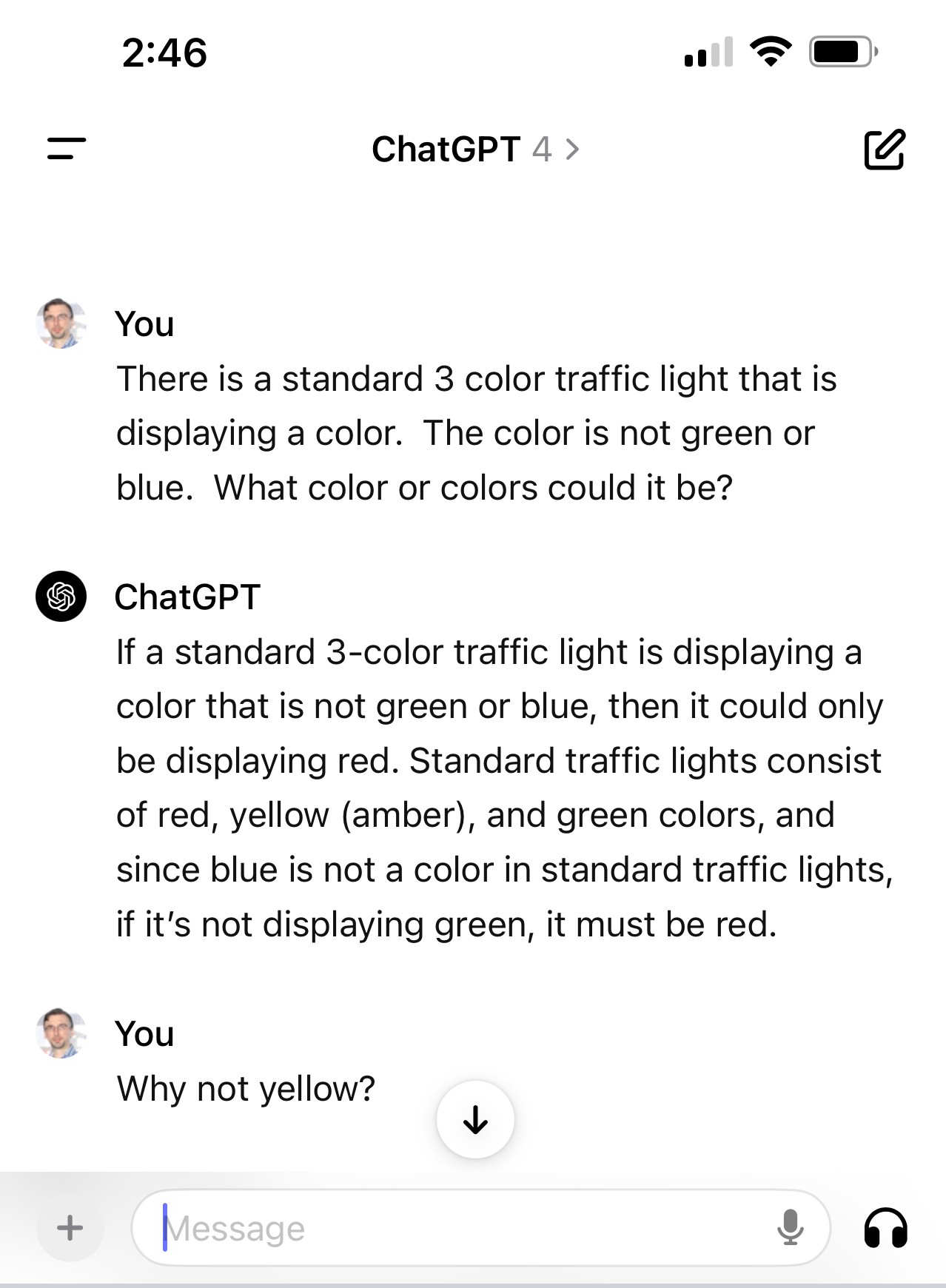




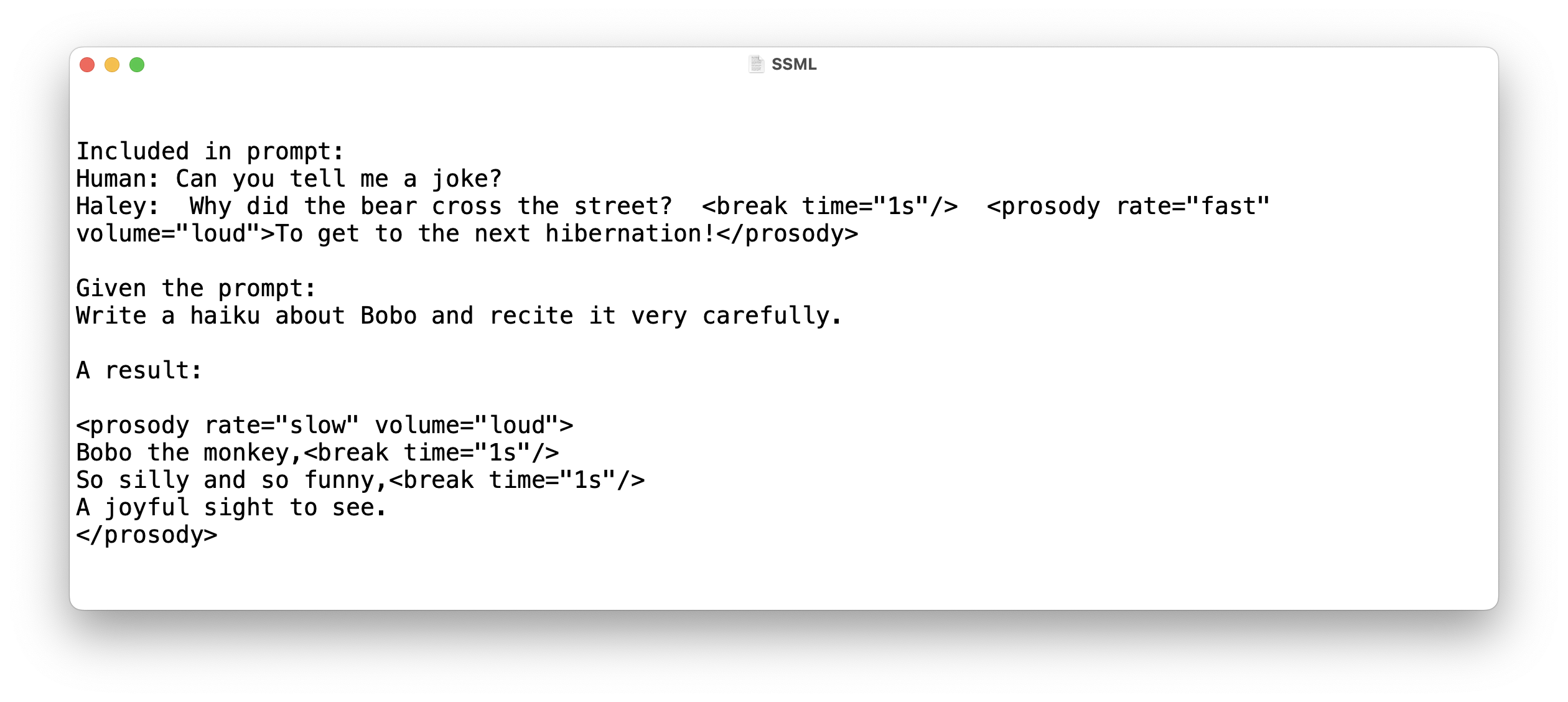
 Vital AI Blog